

Mobile App Experience
Install VedicQ on Your iPhone
Follow these simple steps to add our web app to your iPhone or iPad home screen for quick access. Enjoy a native app-like experience with faster, one-tap access.
1
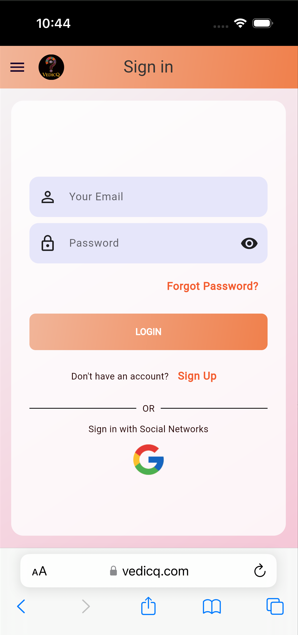
Step 1: Open in Safari
Open the VedicQ Astrology web app in Safari browser on your iOS device.
URL: https://www.vedicq.com/VedicQAstrology
2
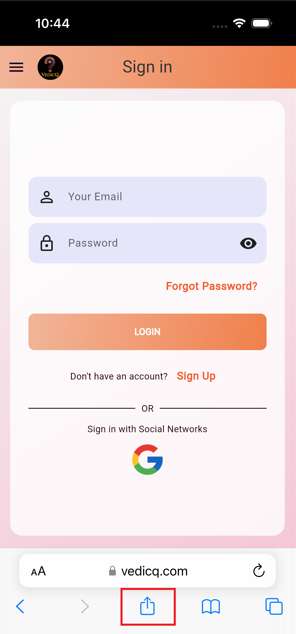
Step 2: Tap the Share Icon
Look for the Share icon (a square with an arrow pointing upwards) at the bottom of the Safari screen and tap it.
3
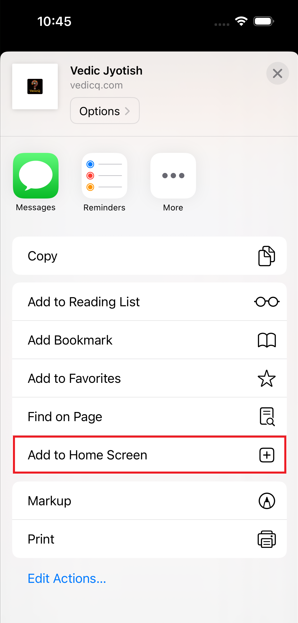
Step 3: Select "Add to Home Screen"
Scroll down the share sheet options and tap on "Add to Home Screen".
4
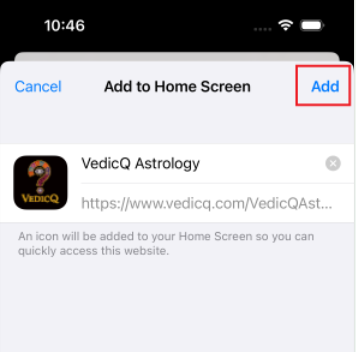
Step 4: Confirm and Add
You can edit the name of the shortcut if you wish. Then, tap "Add" in the top right corner.
5
Step 5: App on Home Screen
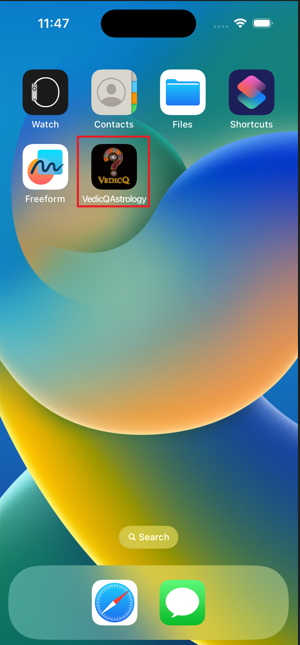
The VedicQ Astrology web app icon will now appear on your home screen for easy access!